LangChain
Gemini
RAG
AI
Next.js
Building a PDF Chatbot with LangChain & Gemini
February 14, 20259 min read
RAG from scratch: chunking PDFs, building a vector store, and wiring up Gemini to answer questions about your documents — step by step.
Retrieval-Augmented Generation (RAG) is the technique that lets you feed a large language model fresh, domain-specific context without fine-tuning. For my PDF Chat Assistant project I used LangChain + Google Gemini to let users upload any PDF and ask questions about it.
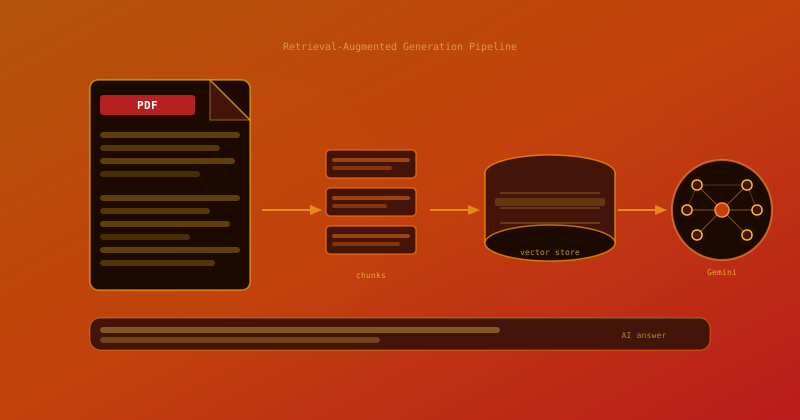
The RAG pipeline
- Parse the PDF → extract raw text (pdf-parse)
- Chunk the text into ~500-token segments with overlap
- Embed each chunk using Gemini's text-embedding-004 model
- Store embeddings in an in-memory vector store (FAISS via LangChain)
- At query time: embed the question, retrieve top-k chunks, pass to Gemini
Key LangChain pieces
ts
import { RecursiveCharacterTextSplitter } from "langchain/text_splitter";
import { GoogleGenerativeAIEmbeddings } from "@langchain/google-genai";
import { MemoryVectorStore } from "langchain/vectorstores/memory";

const splitter = new RecursiveCharacterTextSplitter({
  chunkSize: 500,
  chunkOverlap: 50,
});
const docs = await splitter.createDocuments([pdfText]);

const embeddings = new GoogleGenerativeAIEmbeddings({
  model: "text-embedding-004",
  apiKey: process.env.GEMINI_API_KEY!,
});

const store = await MemoryVectorStore.fromDocuments(docs, embeddings);
Once the store is populated, a similarity search retrieves the most relevant chunks for each user question and injects them into the Gemini system prompt as context. Response accuracy is dramatically better than prompting Gemini with the full PDF raw text.